

SPPU BE E&TC404190, BE Sem VIII, 2019 courseमराठी + English
Fiber Optic Communication for SPPU E&TC
Fiber is the backbone of every modern network, from FTTH at home to submarine cables. Fiber Optic Communication is also one of Prof. Thorat's core teaching areas, and her channel has full coverage, from the basic block diagram to solved SPPU numericals.
The first unit builds the foundation: total internal reflection, acceptance angle, numerical aperture, modes and the losses and dispersion that limit a fiber. Sources (LEDs and lasers) and photodetectors (PIN and avalanche photodiodes) follow, and then the part examiners love: designing a point-to-point link with a power budget and a rise-time budget.
Practise numericals unit by unit. Her power budget videos and the photodiode numerical from an SPPU paper are good models of how to set out an answer. In the lab, the numerical aperture experiment is usually the first one you perform.
Syllabus
SPPU syllabus units (2019 course)
Unit I: Optical Fibers for Telecommunication
Optical spectral bands, power units (W, dB, dBm), block diagram of a fiber link, total internal reflection, acceptance angle, numerical aperture, fiber types, modes and V number, attenuation (absorption, scattering, bending, splices and connectors), dispersion and bit rate–distance product.
Unit II: Optical Sources
Direct and indirect bandgap materials; LED working, quantum efficiency, output power and modulation; laser diodes: emission processes, population inversion, optical feedback; LED vs laser comparison.
Unit III: Photodetectors
p-n, PIN and avalanche photodiodes, phototransistor, quantum efficiency, responsivity, cutoff wavelength, response time, noise sources, receiver sensitivity and bit error rate.
Unit IV: Fiber Optic Link Design & WDM Systems
Point-to-point link: choice of components, optical power budget, rise-time budget, RZ/NRZ bit rate; WDM concepts and components: couplers, isolators, circulators, fiber gratings, OADM, optical amplifiers (SOA, EDFA, FRA).
Unit V: Optical Networks
Network elements and topologies; FDDI, SONET/SDH, FTTx/FTTH, PON and GPON; long-haul, metro, access and submarine networks; fiber in 5G networks.
Unit VI: Optical Fiber Measurements
Field test equipment: visual fault locator, optical power meter, OTDR, OSA, BER tester; measuring power, numerical aperture, attenuation (cutback, insertion loss, OTDR), bending loss and dispersion; eye diagram.
Unit titles follow the SPPU BE E&TC 2019-course syllabus for Fiber Optic Communication (404190). Check your college's copy for any revision.
Free lessons
Videos for this subject
Tap to play here.

Numerical Solutions in GaAs Laser : Previous gate question explained in marathi | #ece #gate2024
Watch on YouTube (opens in new tab)
फायबर ऑप्टिक्स लिंकसाठी पॉवर बजेट विश्लेषण : लांब पल्ल्याचे संप्रेषण SPPU BE ENTC
Watch on YouTube (opens in new tab)
बेंडिंग लॉस फायबर ऑप्टीकस SPPU BE ENTC तोटे आणि अँप्लिकेशन
Watch on YouTube (opens in new tab)
फायबर ऑप्टिक कम्युनिकेशन: ऑप्टिकल डिटेक्टर आणि फोटोडायोड्स! SPPU EnTC अभ्यासक्रम|#fiberoptic
Watch on YouTube (opens in new tab)
Optical Spectrum Band | Explained In MARATHI | Fiber Optics | optical spectral bands
Watch on YouTube (opens in new tab)
Optical Fiber मराठी मध्ये | Fiber Optics Communications block diagram Explained (Gerd Keiser)
Watch on YouTube (opens in new tab)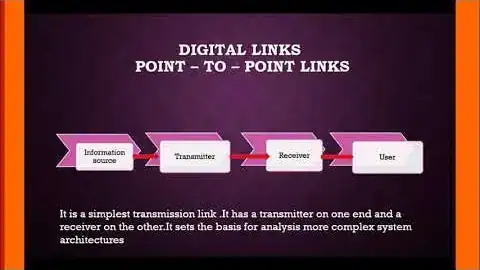
How to Select Fiber Optic Cable, Optical Receiver and Components
Watch on YouTube (opens in new tab)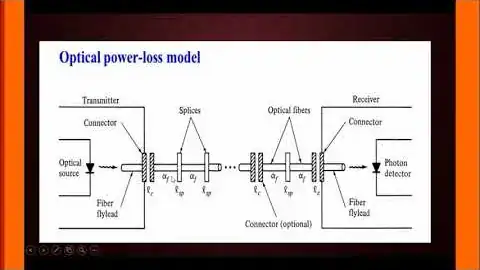
Power Budget Analysis for a Point-to-Point Fiber Optic Link
Watch on YouTube (opens in new tab)Full playlists
Structured course
Want it all in one path?
Fiber OpticsEnglish
Fiber Optics for Telecom: FTTH, WDM & Power Budget
Optical fiber structure, attenuation, WDM, light sources, detectors and link power budget, with a numerical aperture experiment and SPPU PYQ-style solved numericals.
- How optical fiber communication works and where it is used
- Attenuation, modes and signal transmission
- WDM, optical spectral bands, sources and photodiodes
- Link power budget and losses
- Solved numericals for exams, labs and viva
3.5 (6 ratings) on Udemy
17 lectures · 1h 48m · 125 students · updated 5/2026
View on Udemy (opens in new tab)FAQ
Questions students ask
How do I solve a power budget numerical?
Add up every loss in the link (fiber attenuation × length, splices, connectors) plus the system margin, and compare it with the difference between transmitter power and receiver sensitivity, all in dB or dBm. Her power budget videos walk through the full method.
What is numerical aperture in simple words?
Numerical aperture tells you how wide a cone of light a fiber can accept. For a step-index fiber NA = √(n₁² − n₂²), where n₁ and n₂ are the refractive indices of the core and cladding.
PIN or avalanche photodiode: which one is asked more?
Both appear. Learn the structure and working of each, then compare them on gain, responsivity, noise, bias voltage and cost. The PIN photodiode lecture covers the fundamentals in detail.
Is there a numerical aperture lab video?
Yes. “Experiment 1: Measuring the Numerical Aperture of a Fiber” shows the setup and readings.
Is there a structured course?
The Udemy course Fiber Optics for Telecom (17 lectures, about 1 h 48 min) covers attenuation, WDM, detectors and power budget, with SPPU PYQ-style numericals.